loader

Activity No. 16: building a dancing robot (Vittascience Starter kit)

Combine the ultrasonic sensor, servo motor, LED and buzzer with the NUCLEO-L476 board
[iframe][/iframe]We will make a robot that moves as users pass by. You are free to personalize it with cardboard or any other accessories. 

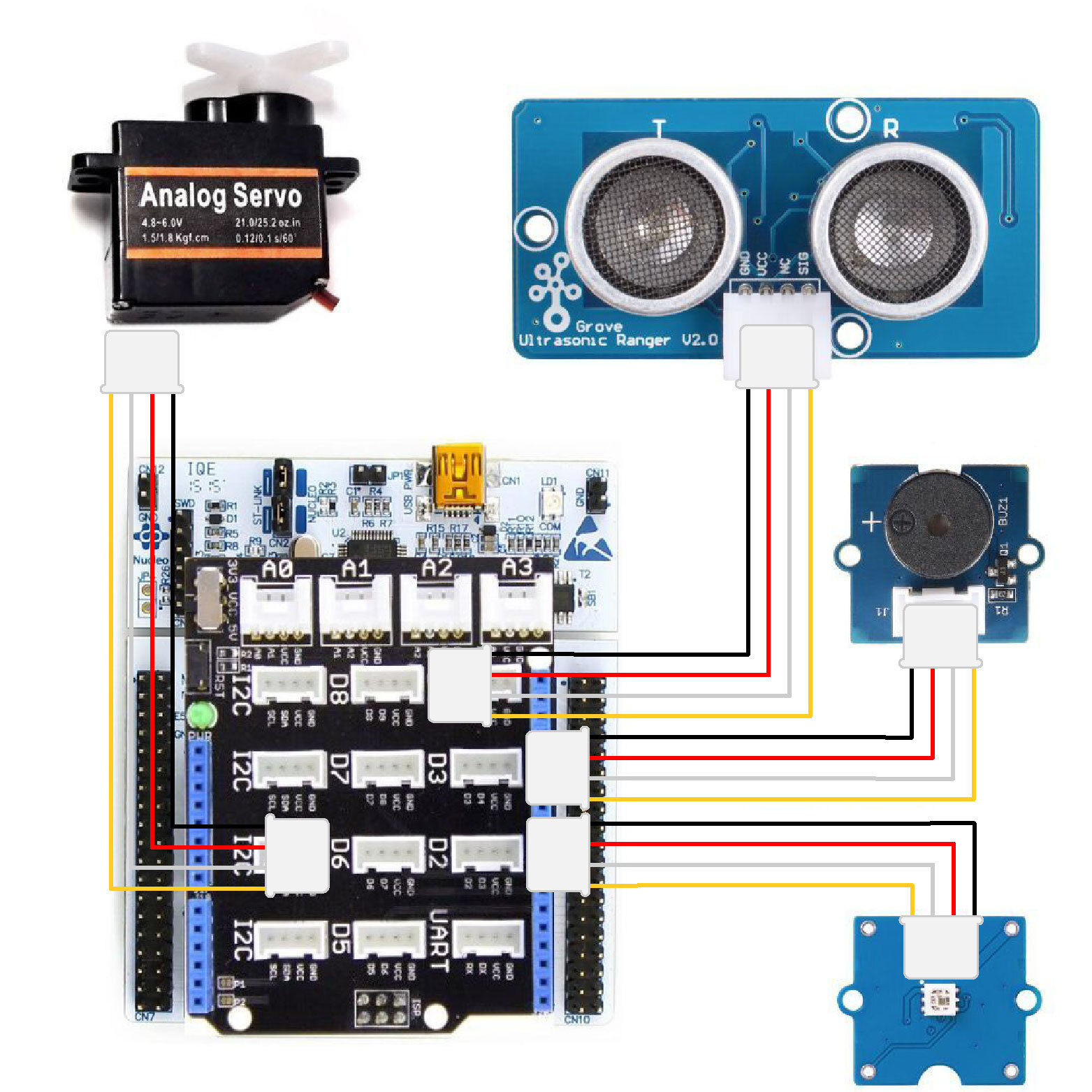
Here is the connection to be made: 
- Connect the Shield Grove to the card connectors. 
- Connect, using the Grove cable, the servomotor to one of the available ports. We will choose port D6. Fix the plastic cross (called rudder) on the top of the servomotor.
- Connect the LED to one of the available ports. We will choose port D2.
- Connect the ultrasound module using the Grove cable to D8.
- Connect the buzzer to D3.

robot-EN

Now let's get to programming! 

The program we are going to create will trigger the movement of the servo motor (to make the robot arm move) when a person passes in front of the ultrasonic sensor.
The LED lights up in different colors and the buzzer emits a sound.

We are going to use several blocks:
- "if...then...else..." available in the Logic of the block locker. 
- "[Grove ultrasonic sensor] distance (cm) D8", available in the Sensors, to retrieve the module value.
- "[Servo motor] control angle at ...° on pin D6", available in the Actuators of the block locker.
- "[Neopixel] control all LEDs at ... on pin D2", available in the Display.
- "[Buzzer/Speaker] play frequency...during...on D3", available in the Actuators of the blocks locker.

-if the distance is greater than 120cm then
check the angle at 0° on D6
check all LEDs black on D2
stop music on D3

- otherwise
check 90° angle on D6
neopixel: Rainbow on D2
play music R2D2 on D3


Use the following interface to create the program: 


Launch the simulator to check the correct execution of your program or download it to the card. 

You succeeded ? Perfect, you now know how to program a dancing robot using your NUCLEO-L476RG board!

User licence